Predicting customer behavior.
A model built from anonymous, aggregate shopper journeys predicts the pages a visitor is likely to hit next, so the browser can warm what matters most for them, starting with the next page's LCP image, before the click.
Serving a page in 63 milliseconds is good. The harder and more interesting problem is the page after it, the one the shopper hasn’t clicked yet. If you can get the important part of the next page onto their device before they ask for it, the click stops feeling like a page load and starts feeling like turning a page in a book.
The browser already has the machinery for this. Chrome can quietly prefetch assets ahead of a navigation, and it can go further and prerender whole candidate pages in the background. Shopify’s themes already lean on both, and it genuinely helps. So the mechanics were never the hard part. The hard part is prediction: knowing which page a given shopper is about to go to, and warming the right thing for that specific person, on that specific store, in their specific market. That prediction is the part we build, and it turns out to be the part a browser-only tool structurally can’t.
What the browser already does, and we keep
Credit where it’s due. A Shopify theme already warms a set of predetermined views, and the browser’s own speculation rules, configured up in the page’s header, let Chrome prerender likely next pages. Both ship in the theme, both help, and LayerKick passes them straight through. Whatever Shopify sets up, we leave in place, the same way we leave its preconnect to its CDNs alone. A performance layer that rips out the platform’s own optimizations to replace them with its own is picking a fight it doesn’t need.
The gap isn’t that this machinery is bad. It’s who it’s tuned for. The predetermined list is the same for every visitor, and it’s oriented around the store’s primary market. If your shoppers are spread across countries and currencies, a lot of that warming lands on the version of a page those visitors will never actually receive. The shopper in the primary market is well served. The one who isn’t is the one we’re for.
What we add: predict per visitor, warm the LCP
Instead of one fixed list for everyone, we predict per visitor and market-aware, and we warm the specific things that matter most for the page that visitor is likely to hit next. And we’re deliberately narrow about what “warm” means. We don’t pull whole pages down on speculation. We start with the next page’s LCP image, the largest element the browser will paint and the single thing that most decides how fast a page feels, plus the render-blocking assets around it. A head start on the part that matters, not a bet on the whole page.
The browser side of this is small on purpose: one inline companion script, no framework, nothing to download. On each page it makes a single request with the current path and gets back the warming hints for that page, because the whole point is to spend less of the shopper’s time, not more.
Then it appends <link rel="prefetch"> tags, a standard browser hint that says “fetch this
quietly now, I’ll probably need it soon,” capped at 80 per page and ordered by what hurts most
if the cap bites: CSS first because it’s render-blocking, then fonts because a missing one flashes
unstyled text, then JS, then images. For images it reads the srcset, the list of resolution
variants a responsive image ships with, and picks the smallest one that still covers the device’s
actual screen, so a phone doesn’t prefetch a desktop-sized hero. On a saveData request or a 2G
connection it does nothing at all, and the request itself waits for the browser’s idle time so it
doesn’t compete for bandwidth with the LCP image the shopper is currently waiting on. The manifest
of what to prefetch is computed server-side, from the actual rendered HTML at ingest time, rather
than guessed in the client where we’d only be re-reading a DOM we already have.
The model
The predictions come from the journeys: which kinds of pages lead to which, recorded anonymously and in aggregate. Enough of those and you have a stable statistical picture of how people actually move through a store, which is all a prediction needs. From a product page, some shoppers head to the cart, some to another product, some back to a collection, and the proportions are surprisingly steady per store.
When the model is confident about where traffic goes next from a given page, the shopper’s browser warms accordingly. When it isn’t, it does nothing, because a wrong guess spends the shopper’s bandwidth and our capacity on a page nobody visits. The bar for acting is deliberately conservative.
Two properties matter for stores that are new or small. A brand-new client benefits from patterns learned across all stores in aggregate, so predictions are useful on day one, before the store has meaningful data of its own. And the model favors recent traffic, so a flash sale or a new drop that shifts shopper behavior gets picked up without anyone retraining anything.
The part that’s hard to copy
That cross-store aggregate is, I think, the genuinely hard part to copy. A client-side prefetch library only ever sees one visitor on one page at a time. It can’t know what a thousand other shoppers did from that same page, because it was never in the room for the other thousand sessions. It’s not a trick, it’s a data position a browser-only tool doesn’t have. The prediction is the moat, and warming the LCP is just how we spend it.
The same view, for the merchant
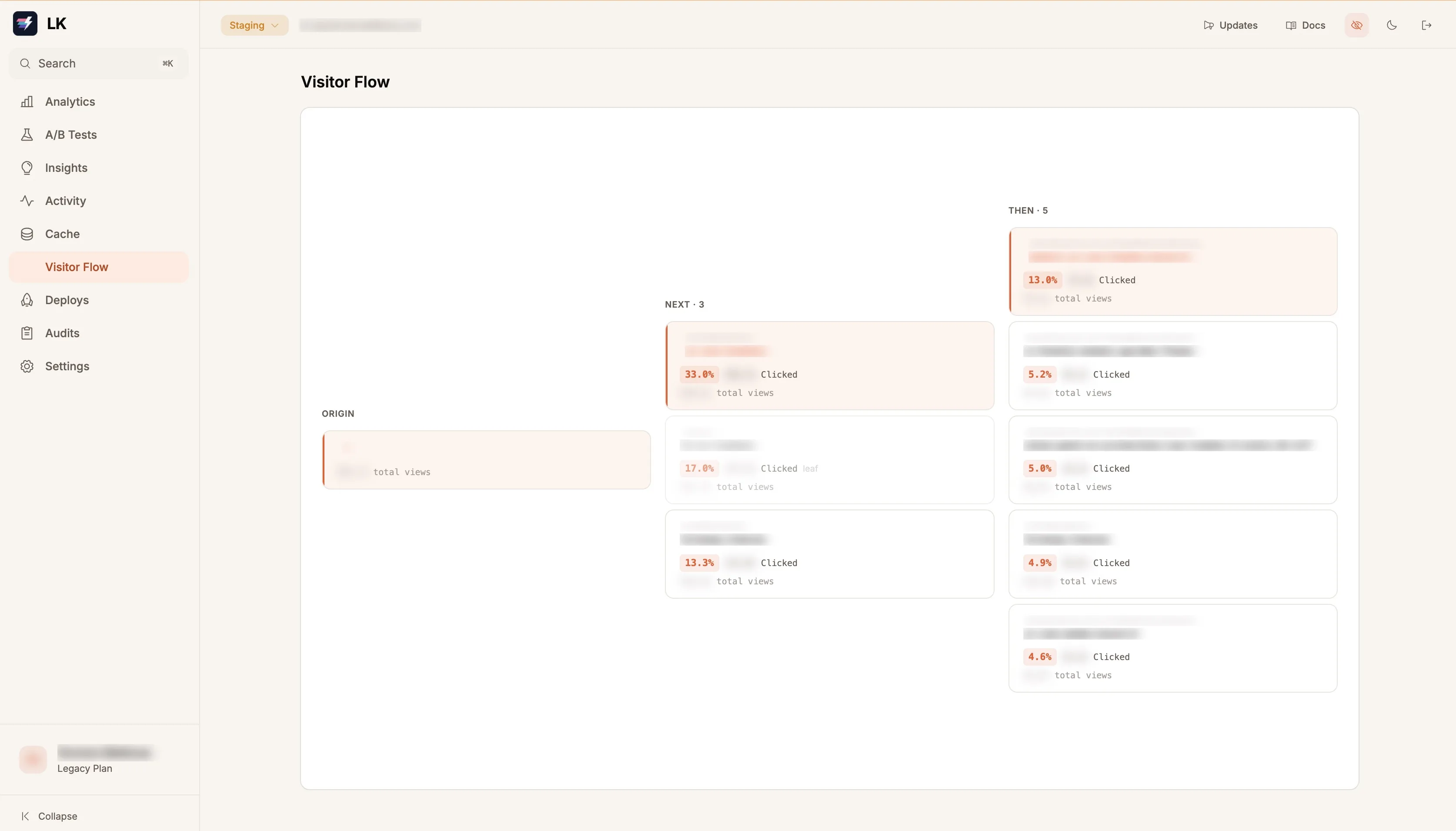
None of this data is locked inside the warming layer. The same journey picture the model reads is something a client can look at directly: type in a URL and see where shoppers historically went next from that page. Every merchant has a mental model of how people move through their store, and it’s usually part guess. This turns the guess into a ranked answer, from a product page to the cart, to another product, back to a collection, in the real proportions the traffic actually took. The prefetch spends the data automatically. The flow view hands it back to the person who owns the store.
Why we ride the browser’s own machinery
There’s a design principle under all of this worth stating. Our warming rides the browser’s
standard hints, <link rel="prefetch"> and the speculation rules Shopify already sets, instead of
anything that sits between the page and the network. The browser’s own HTTP cache enforces rules
we’d otherwise have to reimplement by hand: it only caches GETs, only when a response opts in via
Cache-Control, and invalidation comes free because every asset URL is content-hashed, so a
changed file is simply a different URL.
We considered more aggressive designs and walked away from them. Anything privileged enough to intercept requests is privileged enough to interfere with a cart, and a performance layer that can touch checkout at all is carrying risk it doesn’t need. The standard hints can only ever add speed; there’s no branch where they subtract from the store. That constraint shaped every choice here, and it’s the same fail-open philosophy as the shim itself.
Where it stands today
The prediction layer is live and feeding the LCP prefetch, and it gets sharper as real journeys accrue. The number I actually want to watch is the shopper’s HTTP-cache hit rate as a function of session depth: how often the next page’s assets were already local, plotted against how many pages deep the visit is. If that curve rises page over page, the prefetches are landing ahead of the clicks, which is the whole thesis. The aggregate data will tell us one way or the other, and I’ll report the curve here even if it comes out flat.
Next in the log is the machinery that builds all of this, and why the agents doing the building physically can’t touch production.
LayerKick layers onto your existing Shopify theme and serves it from Cloudflare's edge. If anything goes wrong, traffic passes through to Shopify like we were never there. The fastest way to understand it is to watch it run on your own storefront, and the waitlist is the way in.